कंप्यूटर के प्रकार
Computer अलग-अलग कामों के लिए अलग-अलग प्रकार के होते हैं — size, power और use के हिसाब से। Smartphone से Supercomputer तक — हर एक की अपनी खासियत है।
तकनीक के आधार पर — Analog, Digital, Hybrid
Computer को तकनीक के आधार पर तीन प्रकारों में बाँटा जाता है। जानते हैं हर एक की खासियत:
आकार के आधार पर वर्गीकरण
Size और power के आधार पर computers को इस तरह classify किया जाता है — सबसे छोटे से सबसे बड़े तक:
| # | प्रकार | Type | आकार | Size | Power | मुख्य उपयोग | Main Use |
|---|---|---|---|---|
| 1 | Smartphone | सबसे छोटा — pocket में | कम | Calls, Apps, Camera, Social Media |
| 2 | Tablet | छोटा — 7–12 inch | कम-मध्यम | Videos, Reading, Light work |
| 3 | Laptop | मध्यम — 11–17 inch | मध्यम | Office, Study, Travel |
| 4 | Desktop | बड़ा — टेबल पर | मध्यम-ज़्यादा | Cyber Cafe, Office, Home |
| 5 | Workstation | बड़ा — high-end | बहुत ज़्यादा | Video editing, CAD, 3D Design |
| 6 | Server | Rack / अलमारी | बहुत ज़्यादा | Websites, Data Centers, Networks |
| 7 | Mainframe | पूरा कमरा | अत्यधिक | Banks, Airlines, Railways |
| 8 | Supercomputer | बड़ा कमरा | सबसे ज़्यादा | Weather, Nuclear research, Space |
आसान तरीक़े से याद रखें: जितना छोटा Device, उतना Personal Use (अकेले आपके लिए) — जितना बड़ा Device, उतना Shared Use (एक साथ हज़ारों लोगों के लिए, जैसे Bank या Railway)।
Desktop vs Laptop
Desktop और Laptop दोनों Digital Computers हैं — लेकिन इनके use, price और portability में बहुत फ़र्क है।
- एक जगह fixed — घर/office में रखकर use
- सिर्फ Electricity से चलता है — no battery
- कम खर्च में ज़्यादा performance मिलती है
- बड़ी screen — 19–32 inch तक connect कर सकते हैं
- Parts upgrade करना आसान — RAM, GPU, HDD बदलो
- Repair करना सस्ता और आसान
- Cyber Cafe, Office, Schools के लिए best
- Gaming के लिए बेहतर — powerful parts add हो सकते हैं
- Portable — bag में रखकर कहीं भी ले जाएं
- Battery से भी चलता है — 3 से 10 घंटे तक
- Same spec के लिए Desktop से महंगा होता है
- Screen 11–17 inch — built-in
- Limited upgrade — mainly RAM और Storage
- Repair costly — specialized technician चाहिए
- Students, Professionals, Travel के लिए
- Built-in Camera, WiFi, Bluetooth, Mic, Touchpad
| तुलना बिंदु | Desktop | Laptop |
|---|---|---|
| Portability | Fixed — move नहीं कर सकते | Portable — कहीं भी ले जाएं |
| Power Source | Electricity (direct) | Electricity + Battery दोनों |
| Price (कीमत) | कम — same spec के लिए | ज़्यादा — portability की cost |
| Performance | Better — cooling ज़्यादा efficient | थोड़ा कम — heating issue होती है |
| Screen Size | 19–32 inch (बाहरी monitor) | 11–17 inch (built-in) |
| Upgrade करना | आसान — RAM, GPU, HDD सब | मुश्किल — limited options |
| Repair | सस्ता — parts बाज़ार में मिलते हैं | महंगा — specialized technician |
| Built-in parts | नहीं — अलग monitor, keyboard, mouse | हाँ — camera, mic, touchpad, WiFi |
| वज़न (Weight) | भारी — move करना मुश्किल | हल्का — 1.5 kg से 3 kg तक |
| Best for | Cyber Cafe, Office, Gaming, Home | Students, Travel, Professionals |
Desktop में यह "Portability Tax" नहीं लगता — इसीलिए same पैसे में ज़्यादा Power मिलती है, Parts बदलना आसान है, और Repair सस्ता है। बस एक जगह Fix रहता है, इसलिए Cyber Cafe और Office के लिए ज़्यादा समझदारी भरा Choice है — जहाँ Computer को कहीं ले जाने की ज़रूरत ही नहीं पड़ती।
Desktop vs Laptop — कब कौन सा चुनें?
यह decision आपके काम, budget और ज़रूरत पर depend करता है:
- आपका Cyber Cafe, Office या School है
- Budget कम है लेकिन अच्छी performance चाहिए
- Computer एक जगह fix रहेगा, carry नहीं करना
- Video editing, gaming या heavy work है
- बड़ी screen और full keyboard चाहिए
- आप student हैं — college/coaching ले जाना है
- Travel करते हैं या field work है
- घर में जगह कम है, compact system चाहिए
- Light office work — Word, Excel, Email
- Battery backup ज़रूरी है — power cut का डर हो
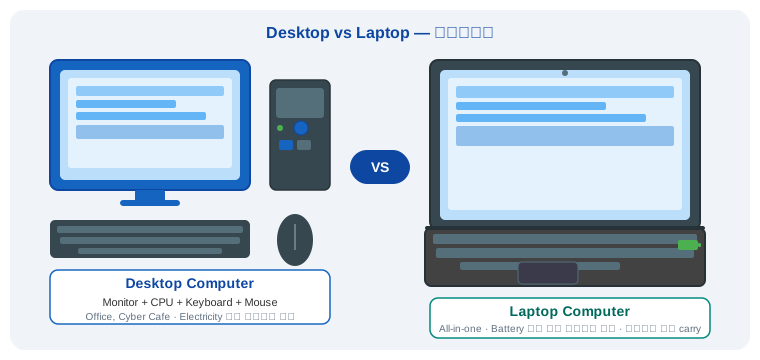
Desktop = एक जगह fixed, सस्ता, powerful · Laptop = portable, battery से चलता है
अन्य Personal Computers — विस्तार से
Desktop और Laptop के अलावा personal use के कुछ और important computer types हैं। इन्हें detail में समझते हैं:
Tablet में WiFi, camera, Bluetooth — सब built-in होते हैं। यह मुख्यतः videos देखने, e-books पढ़ने, online classes और light work के लिए use होता है। Heavy work जैसे video editing या programming के लिए suitable नहीं है।
Smartphone में दो main operating systems होते हैं — Android (Google) और iOS (Apple)। इसमें millions of apps available हैं। 4G/5G से internet, GPS navigation, UPI payment, video calling — Smartphone यह सब कुछ करता है।
Workstation specifically professional कामों के लिए बना होता है — जैसे 3D animation, CAD designing (building/car design), high-resolution video editing, scientific research, और architectural modeling। इसकी cost normal Desktop से 3–10 गुना ज़्यादा होती है।
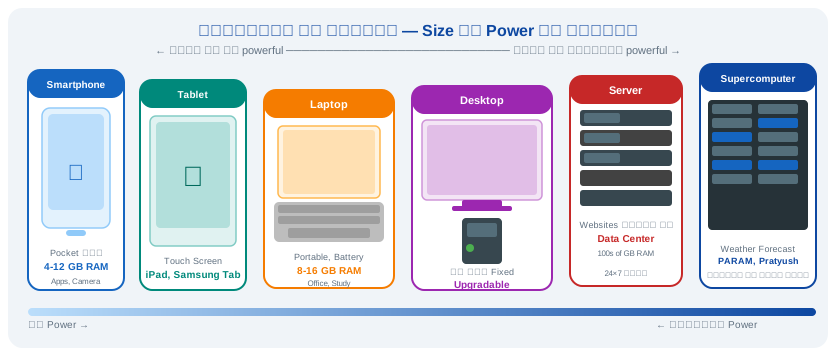
Smartphone से Supercomputer तक — सभी प्रकार के Computers
Server & Mainframe — विस्तार से
ये computers आम लोग directly use नहीं करते — लेकिन इनके बिना internet, banking और booking system काम नहीं कर सकते।
Server हमेशा on रहता है, 24×7। इसे specially designed racks में रखा जाता है जिन्हें Data Center कहते हैं। एक company के हज़ारों servers एक साथ काम कर सकते हैं।
Banks में हर second हज़ारों transactions होती हैं — ATM से पैसे निकालना, UPI payment, balance check — यह सब Mainframe computers handle करते हैं। Airlines में seat booking, Railways में ticket system — Mainframe के बिना यह सब impossible है।
Supercomputer — दुनिया का सबसे तेज़ Computer
Supercomputer दुनिया के सबसे powerful computers हैं। इनकी speed को FLOPS (Floating Point Operations Per Second) में measure किया जाता है — यानी एक second में कितने calculations।
| Supercomputer का उपयोग | काम | Work |
|---|---|
| Weather Forecast | अगले 7 दिनों का weather predict करना — बारिश, cyclone, flood warning |
| Nuclear Research | Nuclear reactions का simulation करना — बिना actual explosion के |
| Space Research | Satellite orbits calculate करना, planetary movements simulate करना |
| Drug Discovery | New medicines के molecules design करना — COVID vaccine research में use |
| AI & Deep Learning | Large AI models train करना — ChatGPT जैसे systems के लिए |
भारत के प्रमुख Supercomputers
- Smartphone भी एक computer ही है — बस size छोटा है!
- PARAM = India का Supercomputer program, C-DAC द्वारा develop किया गया
- Supercomputer = Weather & Research · Mainframe = Banks & Government
- Analog = waves/physical signals · Digital = 0 और 1 (binary)
- Cyber Cafe के लिए Desktop best — सस्ता, durable, easy to repair